Realtime Collaboration (Gossip + Overlay Cache)
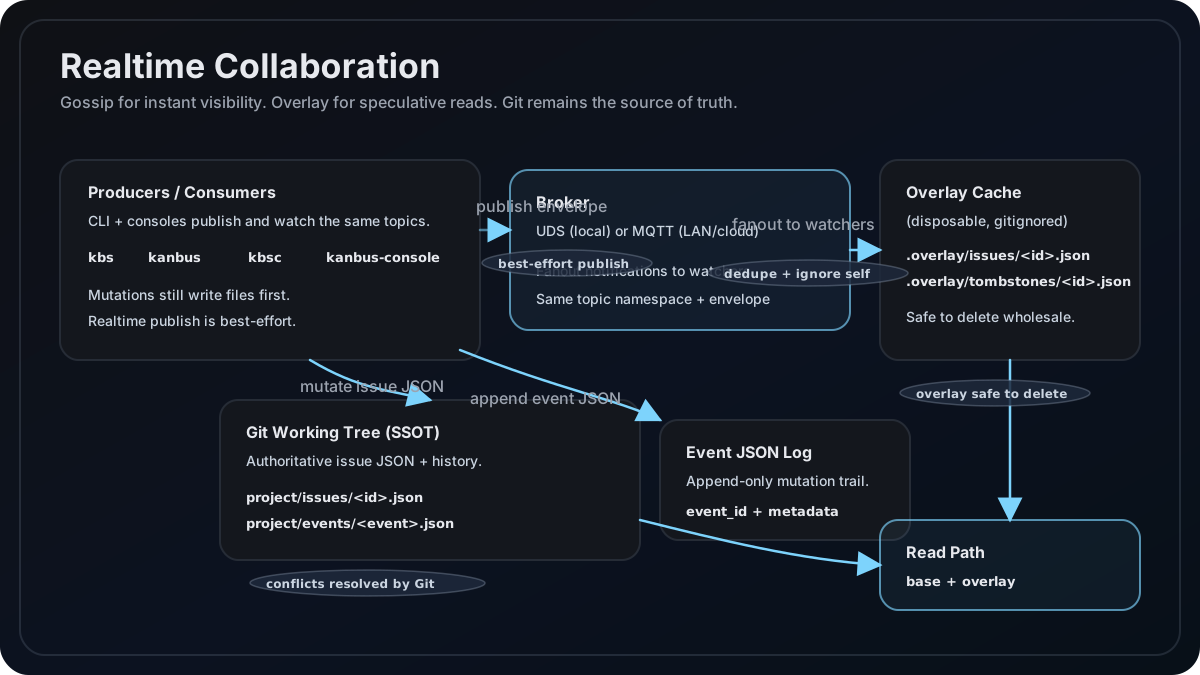
Kanbus adds a realtime gossip channel plus a speculative overlay cache. Git is still the source of truth. Gossip is for immediate visibility; overlay lets you show updates before Git pulls land.
When Mosquitto is required vs optional
Mosquitto is optional for routine Kanbus CLI board work (kbs list, kbs show, kbs create, kbs update, and similar commands). Those commands do not require a local MQTT broker.
Mosquitto is needed only when you explicitly use local MQTT realtime:
kbs gossip watch --transport mqtt --broker auto- MQTT transport with
realtime.autostart=true(opt-in; the default isfalse) and no reachable broker
The default console hub path uses UDS (kbsc plus routine CLI mutations). Install Mosquitto only when you want local MQTT gossip outside the console UDS broker.
Set KANBUS_REALTIME_WARN_MOSQUITTO=0 to suppress the once-per-session Mosquitto install hint for explicit MQTT commands.
Quickstart
One console hub (UDS)
Terminal 1:
kbsc
# or: kanbus-console
Terminal 2:
kbs create "Realtime task"
kbs update <id> --status in_progress
kbs delete <id>
Watch live UI notifications from the console SSE endpoint:
curl -N http://127.0.0.1:5174/api/events/realtime
kbsc subscribes to gossip, writes overlay snapshots/tombstones, and pushes immediate issue_updated / issue_deleted events to the UI.
If you want raw envelope output for debugging, run an explicit watcher:
kanbus gossip watch --print
Local MQTT (Mosquitto autostart)
kanbus gossip watch --transport mqtt --broker auto --autostart
# or: kbs gossip watch --transport mqtt --broker auto --autostart
With --autostart (or realtime.autostart: true), if Mosquitto is installed and no broker is reachable, Kanbus will autostart a local broker and write ~/.kanbus/run/broker.json. Autostart is off by default so ordinary kbs commands never spawn a broker; the console turns it on for its own bridge.
Always-on local broker (recommended for many worktrees and agents)
Every kbs/kanbus process in every clone and worktree on the machine publishes to the same
broker, so one always-on broker gives one live stream of everything happening on the system.
Kanbus's autostart only lives as long as the process that started it (keepalive=false kills it
on exit) and is not started at boot, so it is not a substitute for a broker you keep running.
Install:
brew install mosquitto                                  # macOS
sudo apt install mosquitto mosquitto-clients             # Debian/Ubuntu
Kanbus's own autostart shells out to mosquitto via PATH. Homebrew installs it under
/opt/homebrew/sbin (Apple Silicon) or /usr/local/sbin (Intel), which brew shellenv adds to
login shells but GUI-launched apps or launchd/cron contexts may not have. Running Mosquitto as
an always-on service (below) sidesteps this entirely, which is one more reason to prefer it over
relying on autostart.
Configure a loopback-only anonymous listener. This is explicit because Mosquitto 2.x
defaults changed to refuse anonymous connections. Create or append to the config file — on
Homebrew, mosquitto.conf may not exist yet (only mosquitto.conf.example), so create it:
- macOS:
$(brew --prefix)/etc/mosquitto/mosquitto.conf - Linux:
/etc/mosquitto/conf.d/kanbus-local.conf
listener 1883 127.0.0.1
allow_anonymous true
This binds to loopback only. Do not expose it on a network interface without authentication.
Run as a service that survives reboot:
brew services start mosquitto        # macOS: launchd, restarts at login
sudo systemctl enable --now mosquitto   # Linux
Check it is up with mosquitto_sub -h 127.0.0.1 -t 'projects/#' -v; it should connect and wait.
Point Kanbus at it once, machine-wide:
Both lines are required, not just the broker URL:
kbs setup env KANBUS_REALTIME_BROKER --value mqtt://127.0.0.1:1883
kbs setup env KANBUS_REALTIME_TRANSPORT --value mqtt
With transport: auto (the default), Kanbus prefers the console's local UDS hub
(~/.kanbus/run/bus.sock) whenever one exists, so events never reach the broker even with
KANBUS_REALTIME_BROKER set. Forcing mqtt routes every Kanbus process on the machine,
including kbsc, through the broker. KANBUS_REALTIME_TRANSPORT is the same setting a team
later leaves as mqtt while flipping the broker to mqtts:// for a shared AWS IoT endpoint.
An explicit broker URL bypasses ~/.kanbus/run/broker.json discovery. That file is never
pruned, so if Kanbus previously autostarted a broker, either set the explicit URL (recommended)
or delete ~/.kanbus/run/broker.json. Autostart stays harmless either way: Kanbus only starts
Mosquitto when the configured broker is unreachable, and only ever kills brokers it started
itself.
Verify end to end: keep mosquitto_sub -h 127.0.0.1 -t 'projects/#' -v running in one terminal and run
kbs update <id> --status in_progress in any checkout; the update should appear in the subscriber.
Throwaway test projects can share a project_key (and therefore an MQTT topic) with a real
project, so use the topic in the mosquitto_sub -v output to tell them apart.
Seeing everything:
mosquitto_sub -t 'projects/#' -v— the raw whole-machine firehose, every project and worktree.kbs gossip watch --print— follows the projects known to the current checkout (includingvirtual_projects). Do not add--broker autowhen verifying:autoruns Kanbus's own discovery/autostart, ignores the configured broker, and can start a second Mosquitto (observed on port 1884) that writes a stale~/.kanbus/run/broker.json. Plainkbs gossip watch --print(no--broker) uses the configured broker correctly.kbsc— the board UI for one checkout.
Next step up: for a shared broker across a team instead of one machine, see
CLOUD_CONSOLE_RUNTIME.md for a shared AWS IoT broker
(mqtts:// plus KANBUS_REALTIME_MQTT_API_TOKEN) — the same ~/.kanbus.env settings are all
that change on each developer's machine.
Transport selection
Transport selection follows this rule order:
realtime.transport=udsforces UDS.realtime.transport=mqttforces MQTT.realtime.transport=autoprefers UDS for local console hubs and otherwise falls back to MQTT when UDS is unavailable.
UDS and MQTT share the same topic namespace and message envelope.
UDS default socket path: $XDG_RUNTIME_DIR/kanbus/bus.sock (fallback: ~/.kanbus/run/bus.sock). Override with realtime.uds_socket_path. kbsc auto-starts a local UDS broker when needed.
Broker discovery
Discovery precedence (explicit exception to the no-fallback policy):
~/.kanbus/run/broker.jsonif presentmqtt://127.0.0.1:1883
If realtime.broker=off, realtime is disabled.
Autostart
Autostart applies only to MQTT:
- If
realtime.autostart=trueand no broker is reachable, Kanbus will start Mosquitto bound to127.0.0.1on the first available port. - Metadata is written to
~/.kanbus/run/broker.jsonwithendpoint,pid, and log paths. - If
realtime.keepalive=false, a broker started by the current process is stopped on exit. - Autostart only supports
mqtt://local brokers.mqtts://requires a preconfigured TLS broker.
UDS broker autostart is handled by the console backend (kbsc) when transport resolves to UDS.
Envelope schema
All transports use the same JSON envelope. issue.mutated includes the full issue snapshot.
{
  "id": "uuid",
  "ts": "2026-03-06T12:34:56.789Z",
  "project": "KAN",
  "project_identity": "test-project-id",
  "type": "issue.mutated",
  "issue_id": "KAN-123",
  "event_id": "uuid",
  "producer_id": "uuid",
  "origin_cluster_id": "uuid",
  "issue": { "id": "KAN-123", "type": "task", "title": "..." }
}
Project scope
Events are scoped by the project_id stored in .kanbus.yml, so many projects
can share one broker without seeing each other's events.
project_idis a UUID v4 written bykbs initandkanbus init. It is committed with the project, so every clone, worktree, agent session and machine working on the same project shares it, while different projects (even with the sameproject_key) never collide.- Issue and coordination events are published on
realtime.topics.project_eventswith{project}replaced by theproject_id, for exampleprojects/<project_id>/events, and carry the same value inproject_identity. Theprojectfield keeps the label and routes the event to a project directory. - Consumers subscribe only to their own
project_idtopic. They also checkproject_identityon receipt and drop anything that does not match exactly, including events with no identity, logging only a running count. - A project whose
.kanbus.ymlhas noproject_idhas realtime publishing and consuming turned off. Ordinary commands (create, update, comment, close, list, show, commit and the rest) skip realtime silently and print nothing about it, even when a broker is configured for every repository through~/.kanbus.env. The explanation appears only where realtime is the point:kbs doctorreports it as a warning,kbsclogs it once at startup, and realtime commands such asgossip watchfail with it as an error:Realtime updates are off for this project because .kanbus.yml has no project_id. Run 'kbs migrate project-id' once on the repository's integration branch and commit .kanbus.yml; every clone and worktree then shares live updates. Every machine using this repository needs kbs 0.40.0 or later first. - What realtime does: when a project mutates an issue, the change is published to a broker and every other clone, worktree, console and agent of the same project applies it live, without waiting for a git pull.
- Migration: run
kbs migrate project-id(orkanbus migrate project-id) once per repository on its integration branch and commit.kanbus.yml. The command appends one line, a fresh UUIDproject_id, when absent and leaves an existing one untouched. Commit it once per repository, not per worktree: every clone and worktree then inherits the sameproject_id. Every machine using the repository needs kbs 0.40.0 or later before the line is committed. - Instances older than this change publish on
projects/<project_key>/eventswithoutproject_identity, so they do not exchange events with upgraded ones.
Dedupe and echo protection
- Each receiver keeps a TTL set of seen
idvalues (10–60 minutes). - Ignore any envelope where
producer_idmatches the current process. origin_cluster_idis reserved for future broker bridging.
Coordination MQTT envelopes
Level 2 coordination uses the configured realtime.topics.project_events
topic, which defaults to projects/{project}/events with {project} replaced
by the project_id. MQTT publishes use QoS 0 and retain=false; messages are
best-effort hints, while Git event history remains durable. Coordination fields
are top-level envelope fields, not a nested payload.
Every coordination envelope includes the common id (unique message UUID),
ts (UTC RFC3339 timestamp), project, type, event_id, and producer_id
fields. origin_cluster_id is optional. event_id identifies the immutable
Git event: it identifies the claim event in a CLAIM, the winning claim event in
a LEASE, and the release event in a RELEASE. producer_id is stable for the
publishing process.
The type-specific top-level fields are:
| Type | Required fields |
|---|---|
coordination.claim |
resource, owner, claim_id, lease_ttl_s (positive integer seconds) |
coordination.lease |
resource, owner, claim_id, lease_ttl_s, expires_at (UTC RFC3339) |
coordination.release |
resource, owner, claim_id |
Receivers deduplicate envelopes by id for 3600 seconds and ignore echoes from
their own producer_id. MQTT arrival order does not decide claim ownership:
receivers consider unique claim events received in the contention window and
select the lexicographically lowest (claim_id, owner, event_id) tuple. A
LEASE reports that selected claim; its expires_at is the claim event time
plus its lease_ttl_s. A later claim does not displace a selected active
lease. Multiple workers may publish equivalent LEASE envelopes; global
exactly-once publication is not guaranteed. A RELEASE clears soft visibility
only when its resource, owner, and claim_id match the selected lease.
MQTT partitions can still allow duplicate work; these envelopes do not provide
a hard mutex.
Overlay merge
Overlay lives under each project directory and is ignored by Git:
project/.overlay/issues/<id>.json
project/.overlay/tombstones/<id>.json
Merge rule:
- If a tombstone exists and is newer than base, treat as deleted.
- Else if an overlay snapshot is newer, return the overlay issue.
- Else return the Git-backed issue.
Overlay reconcile, GC, and hooks
overlay reconcile --pruneremoves converged speculative fields and drops empty overlay records.overlay gcsweeps stale overlay snapshots and tombstones.overlay install-hooksinstalls git hooks to run reconcile + GC onpost-merge,post-checkout, andpost-rewrite.
Example:
kanbus overlay reconcile --all --prune
kanbus overlay gc --all
kanbus overlay install-hooks
CLI commands
kanbus gossip broker [--socket PATH]
kanbus gossip watch [--project LABEL] [--transport auto|uds|mqtt] [--broker auto|off|mqtt://...|mqtts://...] [--autostart|--no-autostart] [--keepalive|--no-keepalive]
kanbus gossip watch [..] [--print]
kanbus overlay reconcile [--project LABEL] [--all] [--prune] [--dry-run]
kanbus overlay gc [--project LABEL] [--all]
kanbus overlay install-hooks
Rust installs kbs with the same subcommands.
Deprecated console control commands
The legacy CLI-to-console control channel has been removed. These commands now fail with a migration hint while control messaging is moved to pub/sub:
console focusconsole unfocusconsole viewconsole searchconsole maximize|restore|close-detail|toggle-settings|reload|set-setting|collapse-column|expand-column|selectcreate --focus
Config blocks
realtime:
  transport: auto
  broker: auto
  autostart: true
  keepalive: false
  uds_socket_path: null
  topics:
    project_events: "projects/{project}/events"

overlay:
  enabled: true
  ttl_s: 86400
Environment overrides
Environment values override .kanbus.yml (and .env can supply these when not already set).
Set any of these in ~/.kanbus.env (via kbs setup env NAME --value ...) when the setting
should apply machine-wide, across every clone and worktree, rather than per project:
KANBUS_REALTIME_TRANSPORTKANBUS_REALTIME_BROKERKANBUS_REALTIME_AUTOSTARTKANBUS_REALTIME_KEEPALIVEKANBUS_REALTIME_UDS_SOCKET_PATHKANBUS_REALTIME_MQTT_CUSTOM_AUTHORIZER_NAMEKANBUS_REALTIME_MQTT_API_TOKENKANBUS_REALTIME_TOPICS_PROJECT_EVENTSKANBUS_OVERLAY_ENABLEDKANBUS_OVERLAY_TTL_S
Troubleshooting
- Mosquitto missing: only required for explicit MQTT gossip commands. Routine CLI board work does not need Mosquitto. Install with
brew install mosquitto(macOS) orapt install mosquitto(Debian/Ubuntu). Kanbus prints at most one install hint per process for MQTT commands unlessKANBUS_REALTIME_WARN_MOSQUITTO=0. - Broker not reachable: verify
realtime.brokerandbroker.jsonendpoint; trymqtt://127.0.0.1:1883. If Kanbus previously autostarted a broker,~/.kanbus/run/broker.jsonmay point at a broker that is no longer running — set an explicitKANBUS_REALTIME_BROKER(recommended) or delete that file. - UDS socket missing: start the broker with
kanbus gossip broker.
AWS IoT Core outline
AWS IoT Core requires TLS client certificates and a policy allowing publish/subscribe to projects/{project}/events. In v1, Kanbus documents the shape of the broker URL (mqtts://...) but does not manage certificates automatically.